Tmeto: A Bold Display Font That Commands Digital Attention
It started with a hero section—just me, a half-finished landing page for a ceramicist’s online shop, and that familiar blank space where the headline should live. I’d tried three clean sans serifs. They were legible, sure—but they didn’t *breathe* with the work. The hand-thrown mugs, the earthy glazes, the quiet confidence of her process—it all deserved something sharper, bolder, more intentional. That’s when I dropped Tmeto into the h1, set it at 4.5rem on desktop and watched it hold its ground like architecture.
What Tmeto Feels Like in Real Layouts
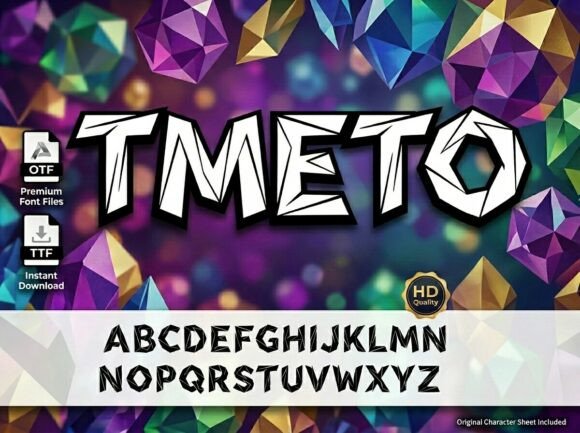
Tmeto is a premium display font built for impact—not decoration. Its letterforms are massive, geometric, and precisely engineered: sharp angles, consistent stroke contrast, and a crystalline clarity that reads like a statement. It’s not playful or whimsical; it’s confident, modern, and quietly authoritative. In practice, that means it thrives where you need instant recognition and visual hierarchy—hero banners, section headers, product name callouts, or CTA buttons that must stop scrolling. I tested it across devices: on a 13" MacBook, it anchors the layout without overwhelming; on an iPhone SE, it remains legible at 2.2rem with tight tracking—and crucially, it doesn’t pixelate or soften on Safari or Chrome.
Where It Shines (and Where to Pause)
Tmeto excels in high-impact, low-text-density contexts:
- Landing page headlines — Paired with Inter or Manrope for body copy, it creates immediate contrast and focus.
- Product name displays — On a boutique online store, “Stoneware Mug” in Tmeto feels like a signature, not just labeling.
- Course or workshop titles — For a digital course landing page, “Foundations of Handbuilding” gains gravitas without needing extra styling.
- Branded campaign pages — Used over a muted photo background, its sharp geometry cuts through softly blurred imagery.
- Portfolio site headers — Gives creative professionals a strong typographic voice without relying on illustration or animation.
But here’s what I learned fast: Tmeto isn’t for everything. It’s not ideal for navigation menus (too bold at small sizes), form labels (lacks fine detail for quick scanning), or paragraph text (its display nature sacrifices readability at length). I tested it at 16px on a dark mode card footer—and while striking, it strained readability. Stick to short phrases, names, titles, and decorative accents. Let your body font do the work; let Tmeto make the first impression.
Responsive Behavior & Practical Web Considerations
One of my biggest concerns was how Tmeto would behave across breakpoints. Good news: it scales beautifully. At 3.8rem on tablet and 2.6rem on mobile, it retains its structural integrity—no awkward gaps, no collapsed counters. I adjusted letter-spacing manually (+0.03em on mobile) to preserve rhythm, and it held up even with dynamic viewport widths. Just avoid setting it as a system font fallback or expecting variable weight interpolation unless the version you license includes true variable support.
Also worth noting: Tmeto performs well with CSS font-display: swap. Load time stays light, and the flash of unstyled text is minimal—especially since most users only need to see the headline once to absorb the brand tone. I served it via a self-hosted WOFF2 file (the most widely supported and compact format), and Lighthouse scores stayed solid across devices.
Pairing It Thoughtfully—Not Just Pretty
Display fonts live or die by their pairings—and Tmeto rewards intentionality. Its geometry pairs best with humanist sans serifs (like Poppins or Recursive) or neutral editorial serifs (such as Literata or IBM Plex Serif) for contrast that feels curated, not chaotic. I avoided overly decorative scripts or condensed fonts—they compete rather than complement. For accessibility and clarity, always test contrast ratios: Tmeto on white meets WCAG AA at 24px+ against #1a1a1a, but on dark backgrounds, use a slightly lighter weight if available, or increase padding to reduce visual crowding.
Licensing, Formats, and What to Check Before You Commit
Before dropping Tmeto into a client site or launching a SaaS dashboard, verify what’s included. My version came with WOFF2, WOFF, and OTF files—enough for web and design handoff—but no variable font axis or Cyrillic/Greek glyphs. If your audience includes multilingual users or you plan to use it in SVG illustrations or Figma prototypes, confirm language support and licensing scope. Most reputable vendors offer clear commercial licenses covering websites, client projects, and digital templates—but double-check whether embedded usage (e.g., in a Notion template or Figma community file) is permitted. And yes—it’s safe for Shopify, Webflow, and WordPress block themes, as long as you’re serving it properly and respecting the license terms.
Tmeto won’t solve every typography problem. But when you need a headline that doesn’t whisper—it declares—this display font delivers with precision, presence, and quiet authority. It’s become my go-to for moments when the design needs to say, “This matters,” before the user reads a single word.