Eliah: A Display Font That Commands Attention—Without Losing Clarity
It was 3 p.m. on a Tuesday—two days before launching a new online course series—and I was tweaking the final Instagram carousel. The headline needed to stop scrollers mid-feed, not just announce the launch, but invite them in. I swapped out our usual clean sans serif for Eliah. Instantly, the first slide felt like it had its own pulse. Not flashy for flashiness’ sake—but alive, intentional, and unmistakably human.
What Eliah Actually Brings to Your Campaigns
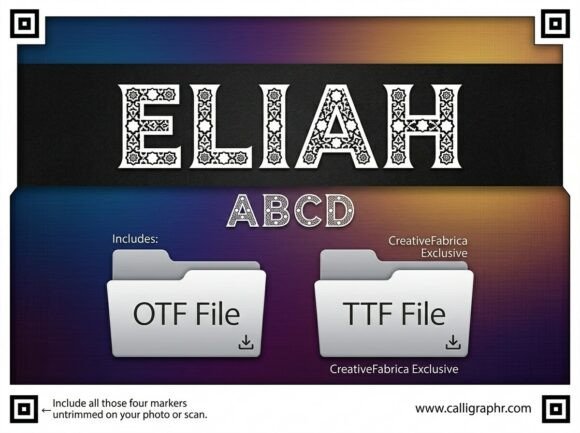
Eliah is a premium display font built for moments that demand presence—not decoration. Its letterforms carry subtle artistic tension: slightly tapered terminals, confident curves, and a rhythm that feels hand-guided but digitally precise. It’s not ornate or fussy—it’s expressive. Think of it as the kind of typeface you’d choose for a boutique gallery opening, a limited-edition product drop, or a bold content series where voice matters as much as visuals.
The mood is confident but warm—neither corporate-cold nor trend-chasing. It communicates creativity with intention, not chaos. And crucially, it doesn’t sacrifice legibility for personality. At 48pt on a mobile preview, Eliah holds its shape. At 32pt over a textured background? Still readable. That balance—character + clarity—is why it works so well in fast-moving digital environments.
Where Eliah Shines (and Where It Doesn’t Try To)
In practice, Eliah excels in short-form, high-impact roles: YouTube thumbnails (especially with tight crop margins), Reels covers (where 0.5 seconds is all you get), Pinterest pins (where vertical space is generous but attention is scarce), and email banners (where it anchors the visual before the copy even loads). We used it for a seasonal webinar banner—just three words: “Your Voice, Amplified”—and it carried the entire tone without needing icons or extra styling.
It’s ideal for:
- Logo-style text treatments (not full logos, but campaign labels like “Summer Edit” or “Founders Series”)
- Headlines in branded template packs (think Canva-ready social kits or Notion course dashboards)
- Quote graphics where typography becomes part of the message (“Trust your instinct” reads differently in Eliah than in Inter)
- Digital ad headlines—especially when paired with minimal imagery and strong negative space
It’s not designed for body copy, dense comparison tables, or legal disclaimers. Don’t force it into tiny UI labels, navigation menus, or multi-line product descriptions. Eliah isn’t shy—it’s selective. It knows its role is to lead, not support.
Real Readability in Real Contexts
We tested Eliah across devices and formats: dark-mode Instagram stories, light-background Pinterest pins, semi-transparent overlays on hero images, and even small-format email headers viewed on older Android devices. It performed consistently well—thanks to generous x-height, open counters, and deliberate stroke contrast.
A few practical notes:
- Mobile previews: Works best at 36–60pt. Below 32pt, some details soften—fine for decorative accents, less ideal for primary messaging.
- Dark backgrounds: Crisp and grounded—no haloing or thin-stroke dropout.
- Fast-scrolling feeds: Its distinct rhythm helps it register faster than neutral fonts, especially in thumbnail size (e.g., 1280×720 YouTube cover).
- Image overlays: Holds up well over low-contrast photography, but avoid placing it directly over busy textures without a subtle drop shadow or background tint.
Smart Pairing & Practical Setup
Eliah thrives when paired with something grounded. We default to a neutral sans serif—like Poppins Light or Manrope Regular—for supporting text, captions, and CTAs. The contrast creates hierarchy without competition. For more editorial contexts (e.g., a blog series or newsletter header), a quiet serif like Lora or Cormorant Garamond adds elegant contrast without drama.
Before dropping Eliah into client work or digital products, always check what’s included: standard weights (Light, Regular, Bold), stylistic alternates (some letters have two or three versions), ligatures (useful for tightening “fi”, “fl”, “ff” in headlines), and multilingual support (it covers Latin Extended-A, so most European languages are covered—but verify if you need Cyrillic or Vietnamese). Licensing is straightforward: commercial use is included, but double-check usage rights if you’re bundling it into editable templates sold on marketplaces.
Final Notes From the Workflow
Using Eliah isn’t about adding “design flair.” It’s about aligning typography with campaign intent. When your goal is resonance—not just recognition—Eliah gives your message texture, warmth, and a point of view. It won’t fix weak copy or unclear offers. But when those pieces are solid? Eliah makes them unforgettable.
We’ve used it across Instagram post series, YouTube thumbnail sets, and digital ad variations—and each time, it reinforced brand consistency without repeating itself. Because while the font stays the same, how it lands changes with context: bold on a sale graphic, delicate in a quote overlay, quietly commanding in a webinar banner.
If your workflow involves creating visuals that need to stand out *with purpose*, not just volume—Eliah earns its place in your display font toolkit.