Stewart: A Display Font That Commands Attention
It was 3 p.m. on a Tuesday—two days before the launch of a new online course series—and I was tweaking the final Instagram carousel post. The headline needed to stop scrollers mid-feed: bold, unmistakable, and unmistakably *ours*. That’s when I dropped Stewart into the banner slide. Instantly, the layout snapped into focus—not because it was louder, but because it felt intentional. Stewart isn’t just another decorative font; it’s a visual anchor with artistic confidence, built for moments like this.
What Stewart Actually Delivers in Real Campaigns
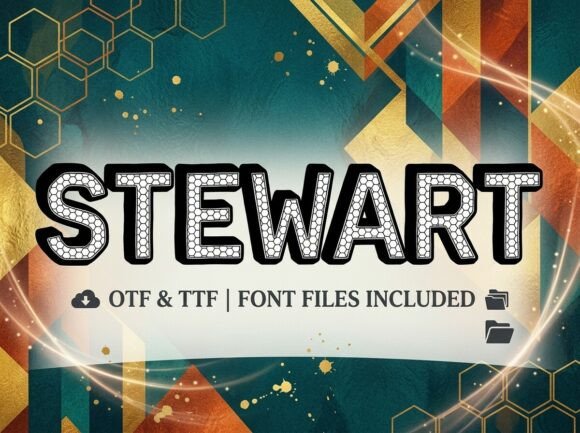
Stewart is a premium display font—not meant for paragraphs or fine print, but for statements. Its letterforms carry expressive weight: subtle asymmetry in the capitals, confident stroke contrast, and a rhythmic flow that feels hand-crafted but never chaotic. It leans modern without chasing trends, and artistic without sacrificing clarity. Think of it as the typography equivalent of a well-placed spotlight—it doesn’t shout, but it ensures nothing else competes for attention.
In practice, Stewart shines where message density is low and impact is high: YouTube thumbnails (especially at 1280×720), Pinterest pin headers, Instagram Story covers, email subject-line graphics, and branded webinar banners. We used it for a seasonal “Early Access” teaser series—just three words per image (“Your Spot Awaits”)—and every version landed with immediate tonal cohesion. The font’s personality reinforced the campaign’s warmth and exclusivity, not despite its decorative nature, but because of it.
Where It Works Best—And Where to Pause
Stewart excels in short-form, high-visibility contexts:
- Social media graphics: Perfect for Reels covers, Pinterest quote pins, and Instagram post headlines—especially over muted photo backgrounds or soft gradients.
- Digital ads: Performs strongly in static and animated banners up to 300×250 and 1200×628 sizes, provided text stays under six words and font size remains ≥48px on desktop previews.
- Landing page headers: Paired with generous whitespace and strong contrast, Stewart adds editorial polish to hero sections—ideal for course launches, limited-edition drops, or brand refresh announcements.
- Branded templates: We embedded Stewart into a set of Canva-ready Instagram Story templates for a small business client. Because it’s designed for display use, it scaled cleanly across devices and retained legibility even when overlaid on textured backgrounds.
That said, Stewart isn’t built for utility. Avoid it in body copy, pricing tables, multi-line product descriptions, or any context requiring fast scanning. It’s also not ideal for formal B2B reports, legal disclaimers, or dense email newsletters—its expressive character can unintentionally soften tone where authority or precision matters. And while it holds up beautifully on mobile previews at headline scale, don’t drop it below 32px in thumbnail-sized assets—some of its finer details (like delicate terminals and alternate glyphs) begin to blur in tiny renders.
Pairing Stewart Smartly Across Campaign Assets
Stewart thrives in contrast. Its strength lies in how it partners with quieter typefaces—not competes with them. In every campaign we’ve used it, pairing Stewart with a clean, neutral sans serif (like Inter, Poppins, or Montserrat) created instant hierarchy and breathing room. For example: Stewart for the headline “Unlock Your First Module,” followed by Montserrat Light at 18px for the subhead and supporting bullet points.
We also tested Stewart with a restrained serif (e.g., Lora) for a more editorial feel—great for blog headers or newsletter banners targeting creative professionals. But avoid stacking it with other decorative fonts, scripts, or handwritten styles unless you’re deliberately building a highly stylized, single-purpose asset (like a limited-run poster). Even then, limit Stewart to one typographic role per composition: title, logo lockup, or campaign tagline—not all three.
Practical Checks Before You Deploy
Before dropping Stewart into client work or public-facing campaigns, we always verify a few things:
- File formats: Confirm it includes both .OTF and .WOFF2 files if you’re embedding it on websites or in web-based design tools.
- Weights & alternates: Stewart includes one primary weight (Bold), plus stylistic alternates and ligatures—use those selectively to add nuance, not noise. We enabled the ‘&’ alternate and swash capital ‘S’ only in hero banners, never in repetitive template elements.
- Licensing: Double-check commercial use rights—especially if you’re bundling it into digital products (e.g., Notion templates, Canva kits) or using it on merchandise. Some display fonts restrict resale or redistribution, even in derivative designs.
- Language support: Stewart covers Latin-based languages well (English, Spanish, French, German), but doesn’t include extended Cyrillic or Asian language glyphs—so skip it for multilingual campaigns unless paired with a fallback system.
Stewart won’t solve weak messaging or poor layout—but in the right hands, it elevates intentionality. It’s the kind of display font that reminds you typography isn’t just about reading—it’s about resonance. When your audience pauses, even for half a second, because the headline feels *designed*, not just placed—that’s Stewart doing its job.