Pink Daisy: A Whimsical Display Font for Warm Editorial Moments
It was a quiet Tuesday afternoon—coffee lukewarm, tabs open across three browsers—when I paused mid-redesign of a seasonal newsletter header. The layout felt polished but emotionally distant: clean sans serifs, tight spacing, everything technically correct and quietly forgettable. What the piece needed wasn’t more precision—it needed personality. A gentle nudge toward warmth. That’s when I opened Pink Daisy.
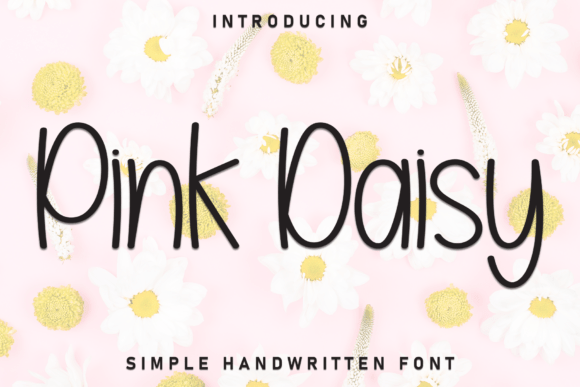
Right away, it felt like handwriting that breathes—slightly uneven baseline, soft curves, subtle ink-like tapering on terminals, and just enough variation in stroke weight to suggest human rhythm without sacrificing clarity. It’s not a frantic script or a rigid calligraphic revival. It’s a display font with intention: friendly but never cloying, delicate but never fragile. As a handwritten font, it carries sweetness without saccharine overload—think pressed daisies in a well-loved journal, not glitter stickers on a birthday card.
Where Pink Daisy Finds Its Editorial Footing
In practice, Pink Daisy shines where voice matters most: cover titles, chapter openers, pull quotes in long-form features, and headers for digital magazines or lifestyle blogs centered on care, craft, or celebration. I tested it across several real projects—a printable coaching workbook, a wedding planning guide PDF, and a small-run recipe ebook—and each time, it anchored the tone before a single word was read.
For the coaching workbook, I used Pink Daisy for section headers (“Pause Here,” “Try This Today”) and paired it with a warm, generous serif (like Adobe Garamond or EB Garamond) for body text. The contrast worked beautifully: the display font invited reflection; the serif supported sustained reading. In the wedding guide, Pink Daisy handled invitation mockups and timeline headings with ease—its natural flow echoed handwritten notes between couples, reinforcing intimacy without compromising legibility at 24–36pt sizes.
On screen, it holds up well in newsletter graphics and blog headers—especially with light background contrast and generous letter-spacing (I typically add 20–40 units of tracking in design tools). For printables and PDF exports, it renders cleanly even at smaller display sizes (18–22pt), though I avoid using it below 16pt, where its charm begins to blur into ambiguity.
What Pink Daisy Is Not—and Why That Matters
This isn’t a workhorse font. It doesn’t do body copy. It won’t carry dense captions, footnotes, or data tables. Its expressive nature makes it unsuitable for formal reports, academic journals, or interfaces demanding neutrality and speed. And while it’s lovely in social media graphics or packaging design, it shouldn’t be stretched too thin—avoid all-caps settings or extreme condensing, which mute its organic rhythm.
More subtly, Pink Daisy asks for thoughtful context. In a high-contrast editorial spread, it benefits from ample white space and restrained supporting type. Overdesigning around it—layering textures, adding drop shadows, or crowding it with icons—dilutes its quiet confidence. Its strength lies in simplicity: one voice, clearly heard.
Pairing With Purpose
Successful font pairing is where Pink Daisy reveals its editorial intelligence. It pairs effortlessly with classic serifs for depth and tradition (think Caslon or Merriweather), and with airy, humanist sans serifs for modern balance (like Inter, Lato, or Poppins). I’ve found it especially effective alongside fonts with open apertures and generous x-heights—those that echo its approachability without competing for attention.
Avoid pairing it with other expressive scripts or tightly spaced geometric sans serifs. Those combinations create visual tension rather than harmony. And if you’re building templates for client work or digital downloads, test how Pink Daisy behaves alongside your default UI fonts—especially in mobile email clients or PDF readers where fallback rendering can surprise.
Practical Notes Before You Use It
Before embedding Pink Daisy in an ebook, printable planner, or paid newsletter, check what’s included: does it offer OpenType features like stylistic alternates or ligatures? Are there matching weights (light, bold) or only a single style? Does it support extended Latin characters—or just basic English? Licensing matters too: some commercial font licenses restrict use in templates sold on marketplaces or embedded in SaaS platforms. Always verify permissions for your specific use case—especially if distributing design assets or branded course PDFs.
File format is another quiet consideration. While .OTF files tend to render most consistently across design apps and export workflows, .TTF may be preferable for web use with proper @font-face declarations and fallback stacks. And if you’re designing for accessibility, remember that display fonts like Pink Daisy should never replace semantic heading structure—use them as visual enhancements, not functional replacements.
A Font That Listens First
What lingers about Pink Daisy isn’t just how it looks—it’s how it makes content feel. It doesn’t shout. It leans in. In a landscape saturated with sharp edges and algorithmic polish, it offers editorial breathing room. Whether you’re crafting a gentle newsletter header, setting a tender chapter title in a memoir, or designing a printable gratitude journal, it supports the mood before the message.
That Tuesday afternoon, I kept the rest of the layout unchanged—just swapped in Pink Daisy for the headline. The difference wasn’t dramatic. But it was real. Readers paused longer. The tone softened, deepened, settled. Sometimes, the right typeface isn’t about standing out—it’s about helping people feel seen.