Picea: A Display Typeface That Commands Attention
It was 3 a.m. during the final push for a client’s online course launch — the kind where every thumbnail, banner, and Instagram Story needs to stop thumbs mid-scroll. I opened the design file, dropped in the headline “Your First Module Starts Now,” and tried three fonts before landing on Picea. Instantly, the text didn’t just sit on the screen — it pulsed. Thick, elongated, liquid-solid letterforms filled the space like poured ink held just shy of spilling. That’s when it clicked: Picea isn’t meant for subtlety. It’s built for impact.
What Picea Actually Feels Like in Campaign Workflow
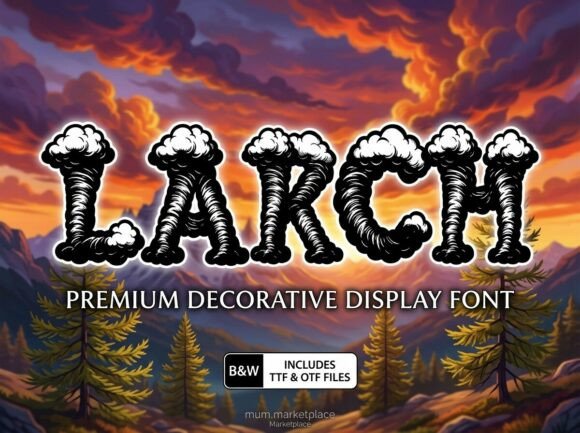
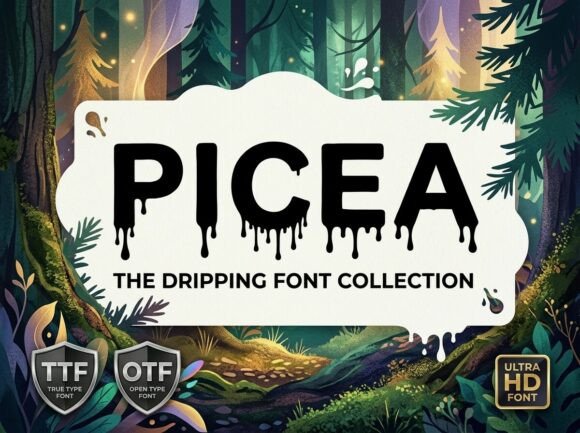
Picea is a premium display typeface — not a workhorse body font, but a bold visual anchor. Its massive, tightly kerned letterforms carry weight without looking rigid. There’s a subtle tension in its design: the curves feel fluid, almost molten, while the strokes remain dense and grounded. It communicates urgency, confidence, and craft — not cold efficiency or playful whimsy, but something more visceral. Think less “friendly announcement” and more “this changes everything.”
In practice, that means Picea shines where you need one clear signal to cut through noise: YouTube thumbnails (especially with tight crop zones), Instagram Reels covers with minimal text overlays, Pinterest pins designed for quick scanning, and digital ad banners where legibility at small scale matters less than instant recognition. I used it for a seasonal shop promotion banner — just two words: “Winter Drop.” No icon, no extra styling. On mobile preview, it held up better than expected: thick strokes resisted pixelation, and the generous x-height kept it readable even at 48px on a 375px-wide canvas.
Where It Works — and Where It Doesn’t
Picea excels as display text: headlines, campaign labels (“Limited Edition”), logo-style wordmarks, quote graphics, webinar banners, email subject line visuals (when exported as image), and branded template headers. It’s ideal for short, high-intent phrases — especially those meant to trigger emotion or action.
But here’s what I learned testing it across formats:
- Don’t use it for body copy, captions, or long subheads. Even at 24px, readability drops fast — especially on light backgrounds with low contrast.
- Avoid tiny applications. Below 32px, fine details blur; on dark mode previews or fast-scrolling feeds, it can read as a solid shape rather than letters.
- Steer clear of formal corporate decks or compliance-heavy emails. Its personality is too strong for contexts demanding neutrality or precision.
- Test contrast rigorously. On light backgrounds, pair with deep charcoal or black — never gray. On dark, use crisp white or off-white; avoid yellow or pastel highlights unless intentionally stylized.
Real Pairings That Keep Campaigns Balanced
Picea doesn’t play well with other heavy fonts — it crowds space. But it pairs beautifully with restraint. My go-to combo? Picea for the headline + a clean, neutral sans serif (like Inter, Montserrat, or even system fonts like SF Pro) for all supporting text. That contrast creates hierarchy without competition. For a content series banner, I used Picea for the episode title (“Volume III”) and set episode descriptions in a light-weight sans — instantly clear who’s speaking and what’s being said.
For more expressive campaigns — say, an artisanal workshop series — I’ve paired Picea with a delicate, upright script (not flowing, not ornate) for names or taglines. The contrast feels intentional, not chaotic. Just remember: if Picea is the voice shouting from the stage, everything else should be the mic, the lighting, and the quiet pause after.
Practical Checks Before You Drop It Into Production
Before locking Picea into templates or client assets, I always verify:
- Style range: Does the package include at least Regular and Bold? (Picea’s weight variation affects how much “mass” it carries in different contexts.)
- Ligatures & alternates: Some versions offer stylistic alternates — useful for avoiding awkward letter collisions in short words like “Drop” or “Now.”
- File formats: Ensure .woff2 and .woff are included if embedding on websites; .otf/.ttf for design apps and static exports.
- Licensing clarity: Confirm commercial use rights cover digital ads, social templates, merch, and client projects — especially if reselling branded assets.
- Language support: Check coverage for accented characters if your audience includes Spanish, French, or Scandinavian languages. Not all display fonts handle diacritics gracefully.
One last note: Picea isn’t about blending in. It’s about claiming space — visually, emotionally, and strategically. Used with intention, it turns a banner into a statement, a thumbnail into a hook, and a launch graphic into something people remember not just for the message, but for how it felt to see it.