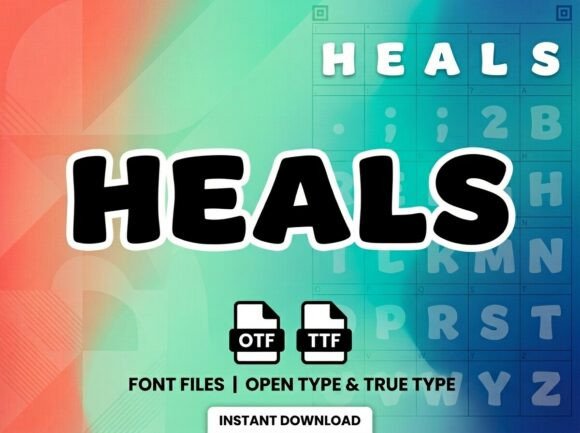
Heals: A Standout Display Font for Digital Branding
I was deep in the final round of a boutique coaching site redesign—hero section nearly locked, image banner selected, and the headline still feeling… safe. Not wrong, just quiet. So I swapped in Heals, typed “Your Journey Begins Here,” and hit preview. Instantly, the page exhaled. Not louder—but *bolder*, more intentional, like the design had just remembered its voice.
What Heals Brings to the Screen
Heals is a premium display font with unmistakable presence: high-contrast strokes, subtle organic swellings, and carefully balanced negative space that gives it both elegance and grounded warmth. It’s not minimalist—but it’s never chaotic. Think of it as the kind of typeface you’d choose for a brand that values authenticity over polish, clarity over clutter, and emotional resonance over trend-chasing. As a display font, it’s built for impact—not endurance—and it delivers every time it appears above the fold.
Real Layout Testing: Where It Shines (and Where It Doesn’t)
I tested Heals across three key web contexts: a hero headline over a soft-focus lifestyle photo, a section title on a course sales page, and a decorative accent in a digital brand kit PDF preview. On desktop, it held its own at 48px with generous letter-spacing—crisp, confident, and easy to scan. On mobile? At 36px with slightly tighter tracking, it remained legible without sacrificing character. But I quickly learned its boundaries: it’s not for navigation menus, form fields, or paragraph text. Even at 20px, readability drops—not because it’s poorly designed, but because it’s intentionally expressive. That’s not a flaw; it’s focus.
One real win came when pairing Heals with Inter (a clean, highly legible sans serif) on a landing page. The contrast worked beautifully: Heals anchored the emotional hook (“Clarity. Calm. Confidence.”), while Inter carried the supporting message and CTA with calm authority. That kind of intentional font pairing—display font + functional body font—is where Heals truly elevates a digital experience.
Practical Web Use Cases That Just Work
- Landing page headlines: Especially for creative services, wellness offerings, or personal brands—where tone matters as much as message.
- Section dividers and feature titles: “How It Works,” “What You’ll Gain,” “Client Stories”—short phrases where visual rhythm supports scannability.
- Digital brand kits: Perfect for cover pages, mood board headers, or typography samples—its personality reinforces brand voice before a single word is read.
- Blog post headers (H1/H2): When used sparingly and paired with ample line height, it adds editorial distinction without overwhelming.
- SVG-based illustrations or interactive elements: Its strong outlines and consistent stroke weight translate cleanly into vector formats for animations or micro-interactions.
What to Check Before You Embed
Before adding Heals to your next project, verify what’s included. Does the package offer WOFF2 and WOFF files for optimal web performance? Are there stylistic alternates or ligatures that enhance certain pairings (like “Th” or “ff”)? Is there a lighter or bolder weight—or is it a single-weight display font? For most web use, one well-hinted, modern-weight file is enough—but if you’re building a scalable design system, having at least two weights (e.g., Regular + Bold) adds flexibility.
Licensing is equally important. Confirm it includes commercial web use—especially if you’re using it on client sites, SaaS dashboards, or subscription-based digital products. Some display fonts restrict usage to personal projects or require extended licenses for embedded web fonts. A quick glance at the license file saves headaches later.
Accessibility & Responsiveness Notes
Heals performs well against light and dark backgrounds—its open counters and generous x-height help maintain contrast. Still, always test contrast ratios (aim for at least 4.5:1 for large text) and avoid placing it directly over busy imagery without a subtle overlay or text shadow. For accessibility, never rely on Heals alone to convey meaning—pair it with clear semantic HTML (e.g., for main headlines) and ensure all interactive elements use accessible fallbacks.
On responsive layouts, I found it best to set Heals in rem units and adjust letter-spacing at breakpoints—not just size. A little extra breathing room on mobile keeps the shapes distinct. And while it loads quickly as a self-hosted font, avoid loading multiple decorative fonts on one page; Heals earns its spotlight by being the only one.
Final Pairing Tip
For web designers who love contrast, try Heals with a gentle serif like IBM Plex Serif for long-form blog content—or stick with a neutral sans like Manrope or Space Grotesk for clean, contemporary balance. Avoid pairing it with other high-personality fonts (like dramatic scripts or condensed tech fonts); Heals doesn’t compete—it commands attention, then invites the rest of the layout to settle around it.