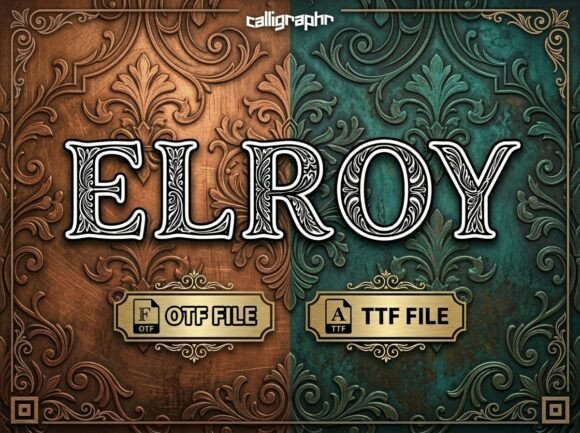
Elroy: A Bold Display Typeface for Impactful Web Design
As a UI designer who builds landing pages, SaaS dashboards, and brand-forward e-commerce experiences, I reach for display fonts not just for flair—but for function. Elroy stands out because it delivers strong visual personality without sacrificing digital clarity. It’s not a background player; it’s the headline that stops scrolling, the hero title that anchors a layout, and the typographic signature that reinforces brand tone in under three words.
Elroy is a decorative display typeface with confident proportions, subtle artistic flourishes, and a rhythm that feels both contemporary and intentional. Its letterforms balance structural integrity with expressive details—think tapered terminals, gentle contrast in stroke weight, and generous x-heights that support legibility at larger sizes. Unlike overly ornate script or condensed sans serifs, Elroy remains readable on screen while commanding attention. That duality makes it unusually versatile across digital contexts.
Where Elroy Earns Its Place in Your Layout
In real-world web design, Elroy shines where hierarchy and intent matter most:
- Hero sections: Pair Elroy with a clean sans serif (like Inter or Manrope) for headlines over full-width banners—its presence creates immediate focal weight without competing with imagery.
- Landing page CTAs: Use Elroy for primary buttons or short action phrases (“Start Free Trial”, “Join the Waitlist”)—its bold character signals importance and urgency, especially when sized responsively.
- Online store banners: Boutique brands, creative studios, and premium product launches benefit from Elroy’s confident tone in promotional headers and limited-time offer graphics.
- Course and membership sites: On sales pages or module titles, Elroy communicates authority and polish—ideal for coaching, design education, or SaaS onboarding flows.
- Portfolio and personal brand sites: As a headline font for project cards or “About” section titles, it adds distinction without overshadowing content or interface elements.
Readability & Responsiveness: Practical Considerations
Elroy performs best at larger sizes—typically 32px and up on desktop, scaling to 28px minimum on mobile. It’s not designed for body copy, navigation labels, or small interface text. For those roles, pair it with a highly legible sans serif (e.g., Inter, Open Sans, or Lato) or, for editorial or luxury contexts, a refined serif like Playfair Display or Cormorant Garamond.
On dark backgrounds, Elroy maintains contrast effectively—especially with its default weight—though avoid ultra-thin variants if using overlays or low-luminance images. Test spacing carefully: letter-spacing of 0–2% often improves rhythm in all-caps usage, while line-height should remain generous (1.2–1.4) to preserve openness.
For responsive layouts, define font-size using clamp() values or viewport-relative units to ensure Elroy scales gracefully without becoming cramped on smaller screens. Never force it into tight containers—its strength lies in breathing room.
Font Pairing That Supports Clarity and Brand Voice
A great display font like Elroy doesn’t work in isolation. Its effectiveness multiplies when paired thoughtfully:
- Sans serif pairings: Ideal for tech, SaaS, and modern e-commerce brands. Try Elroy with Inter (variable), Poppins, or Montserrat for clean contrast and balanced visual weight.
- Serif pairings: Elevate editorial, creative agency, or lifestyle brands. Combine Elroy with Merriweather, Crimson Text, or PT Serif to add warmth and narrative depth.
- Avoid pairing with other decorative fonts—including scripts or heavy slab serifs—unless intentionally creating high-contrast graphic moments (e.g., social media banners).
Licensing, Formats, and Real-World Deployment
Elroy ships as a premium font with standard OpenType (.otf) and web-optimized WOFF2 files—essential for fast-loading, accessible typography on live sites. Most licenses include desktop, web, and app usage rights, but always verify scope before deploying in client projects, white-label templates, or online stores with embedded branding assets.
If your project requires multilingual support, check whether Elroy includes extended Latin characters, diacritics, and localized glyphs—critical for global-facing sites or bilingual content. Some versions also offer stylistic alternates or ligatures, useful for logo lockups or branded social graphics where subtle variation adds polish.
When to Reach for Elroy—And When to Hold Back
Reach for Elroy when you need:
- A single, memorable typographic statement—like a site name in the header or a campaign tagline.
- Emotional resonance: confidence, creativity, craftsmanship, or curated energy.
- Visual distinction in crowded digital spaces—landing pages, ad creatives, or email headers.
Hold back when:
- You’re designing dense UI tables, form fields, or micro-interactions—Elroy isn’t built for functional text density.
- Your audience skews toward accessibility-first requirements without fallback strategies (always declare a system font stack).
- The brand voice calls for neutrality, minimalism, or technical precision—then a restrained sans serif may serve better.
Used with intention, Elroy does more than decorate—it clarifies purpose. It tells users what matters first, reinforces brand posture at a glance, and supports conversion by guiding the eye toward what’s essential. In a world of algorithmically optimized layouts and shrinking attention spans, a well-chosen display typeface like Elroy remains one of the most direct tools we have to shape perception, trust, and action—all through thoughtful typography.